Free
$0
Everything that runs on your own machine.
- Code, Prose and Split views
- Outline and "Used in" for every file
- Search and change-impact tracing
- Write and edit accounts by hand
- Accounts saved in your repository
 CLIDE
Clear IDE
AI agents write code faster than anyone can read it line by line, and you are still the one responsible for it. CLIDE keeps a plain-language account beside every source file, tied to the exact lines it describes. Read what the code does, then check it in one hover.
Runs on your machine · macOS, Linux and Windows · Node 22.18 or newer
Method L37–45
absoluteThe gate every path from the browser passes through. It rejects values that aren't strings or contain a NUL byte, resolves the path against the workspace root, and throws a 403 WorkspaceError if the result is neither the root itself nor inside it, which is what stops ../../etc/passwd style requests.
Double-checkThis check is textual: it does not follow symlinks, so on its own it would accept a link inside the workspace that points outside. contained adds that check and is what read and write use.
Method L51–60
containedRuns absolute, then resolves symlinks on both the target and the workspace root and checks again that the real location is still inside. If the target doesn't exist yet, realpath fails and the unresolved path is used, so the caller's own existence check decides what happens next.
Method L62–75
readReturns a file's contents as UTF-8 text, or throws a WorkspaceError explaining why it can't.
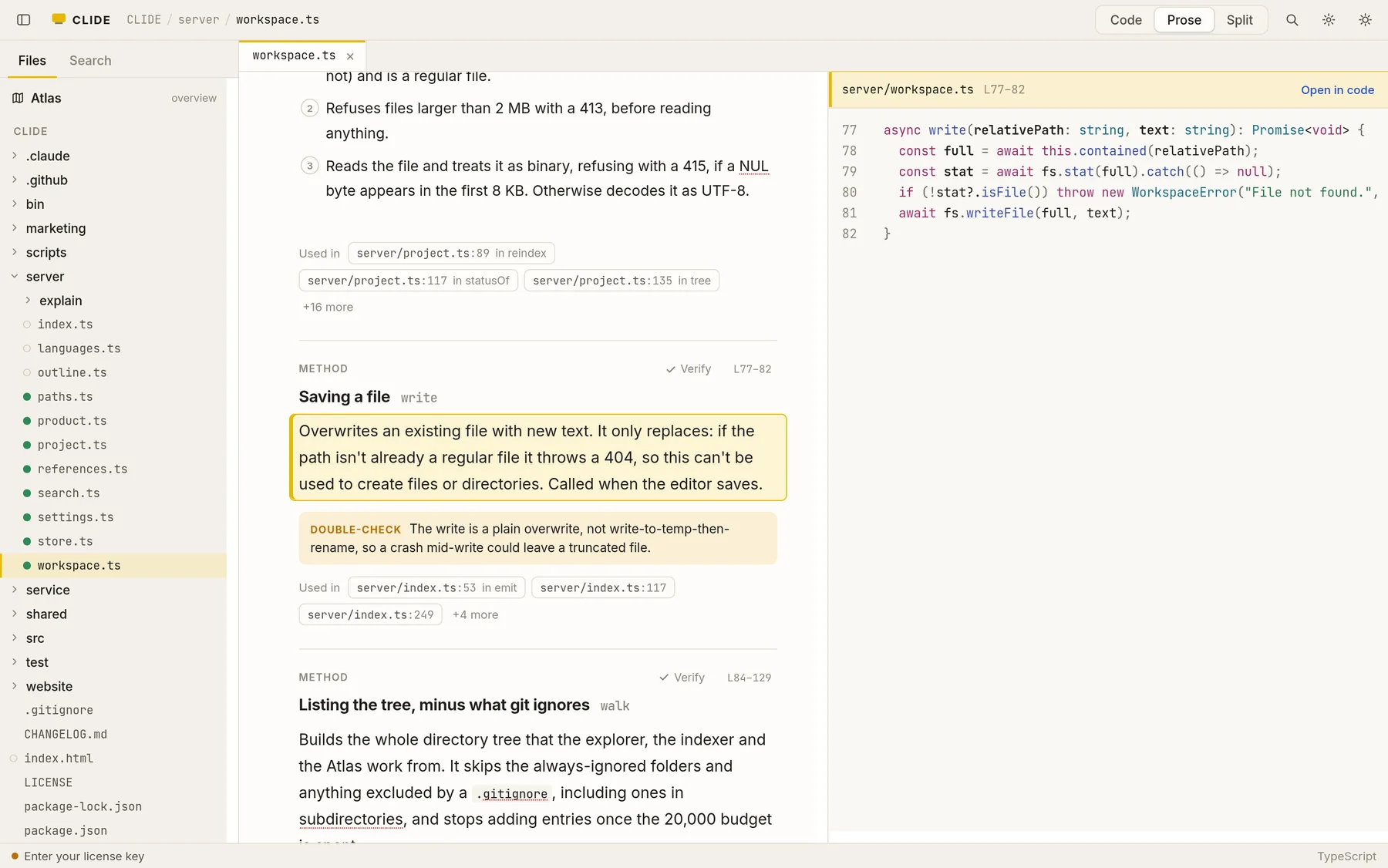
Method L77–82
writeOverwrites an existing file with new text. It only replaces: if the path isn't already a regular file it throws a 404, so this can't be used to create files or directories. Called when the editor saves.
Double-checkThe write is a plain overwrite, not write-to-temp-then-rename, so a crash mid-write could leave a truncated file.
This is real output: CLIDE's account of one of its own files. In the app, every file reads like this.
You could ask an assistant to explain a function each time you need to know. CLIDE does it once for the whole project, keeps the answers next to the code, and tells you when they stop being true.
Every function, class and method gets a short title and a few sentences on what it does and why it exists. Longer bodies are broken into numbered steps. Switch any file between Code, Prose, or both side by side.
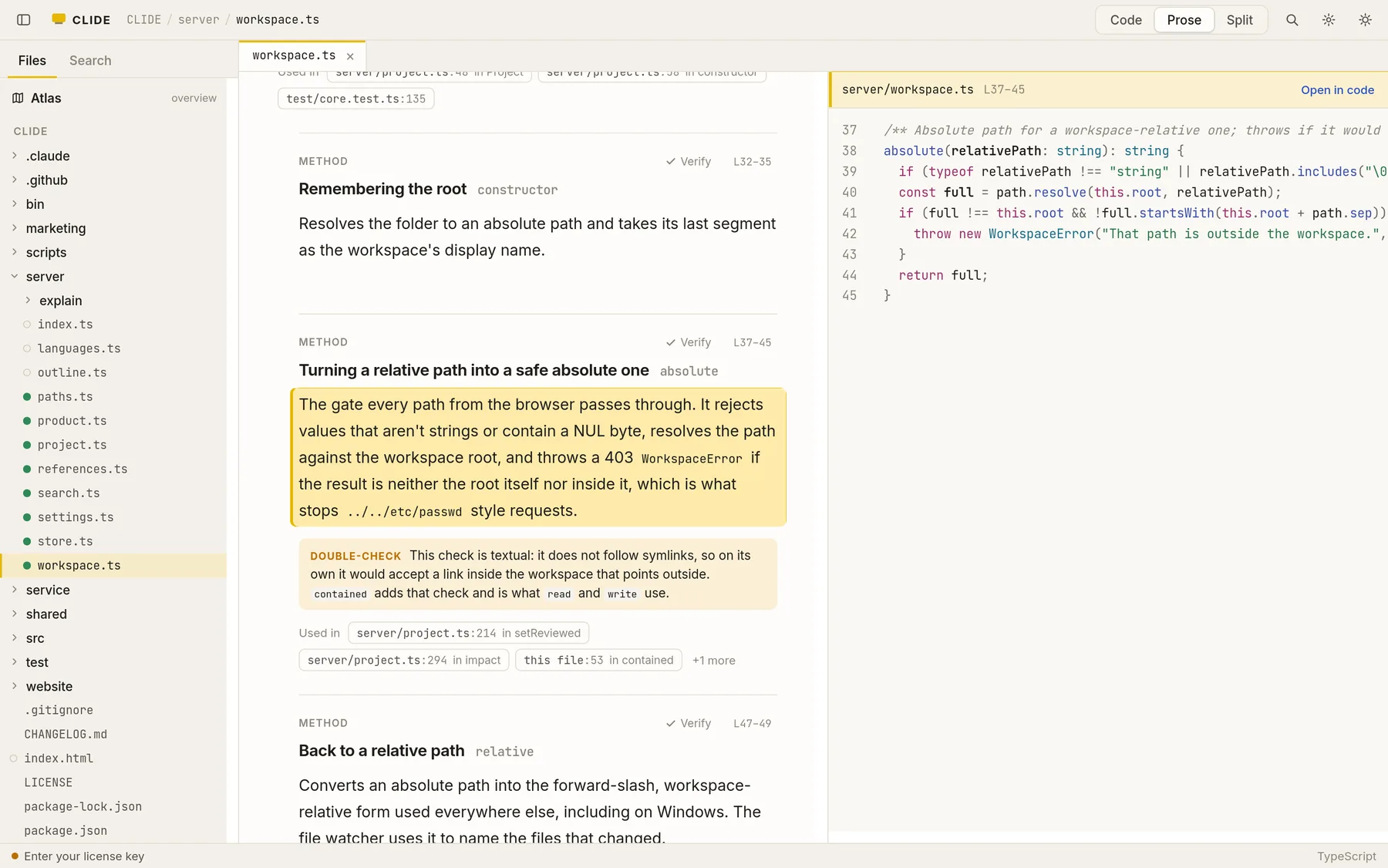
Each sentence is anchored to the lines it describes. Point at it and those lines light up; point at a line and its sentence does. Where something deserves a closer look, such as a swallowed error or an unvalidated path, the account says so in a double-check note.
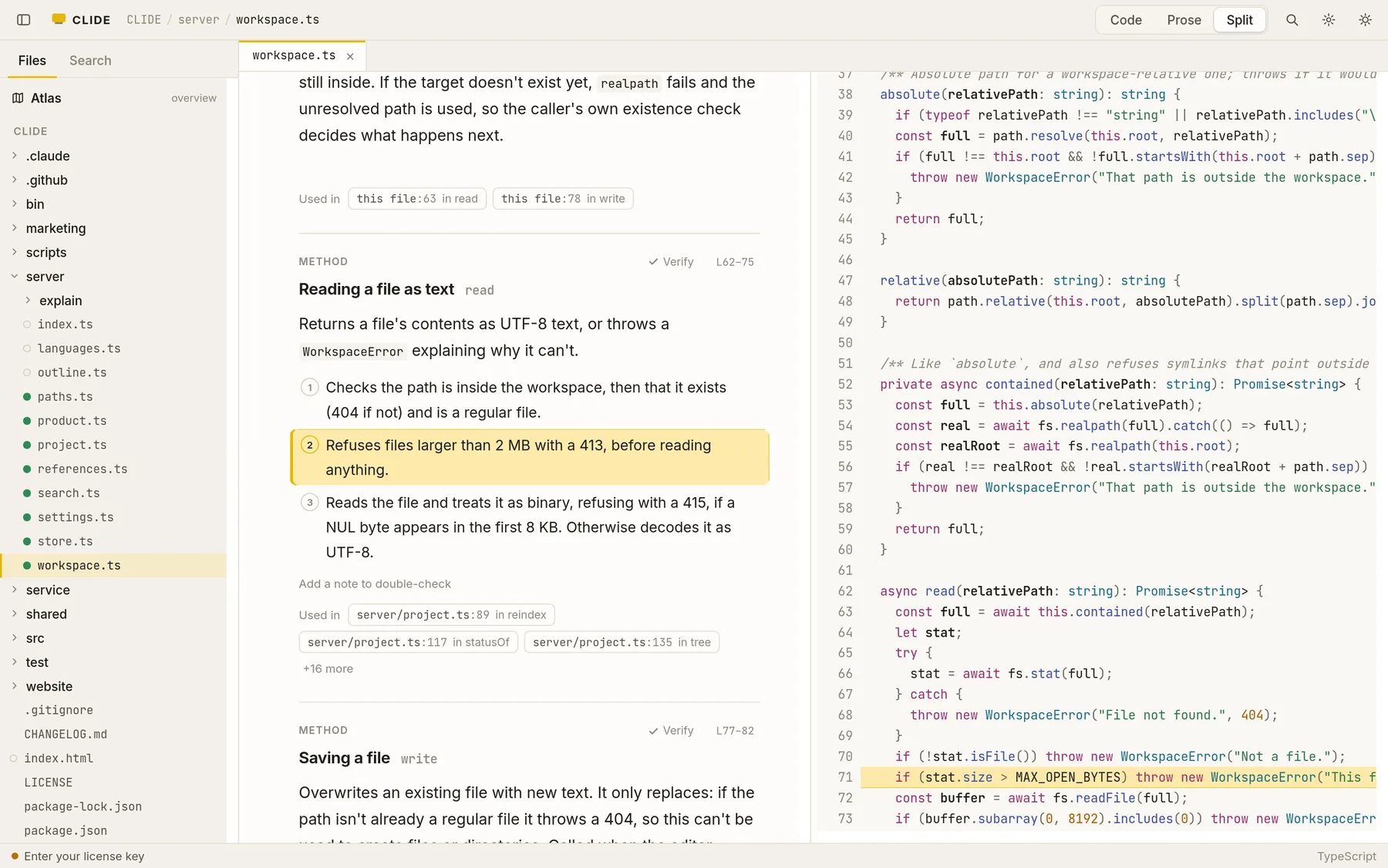
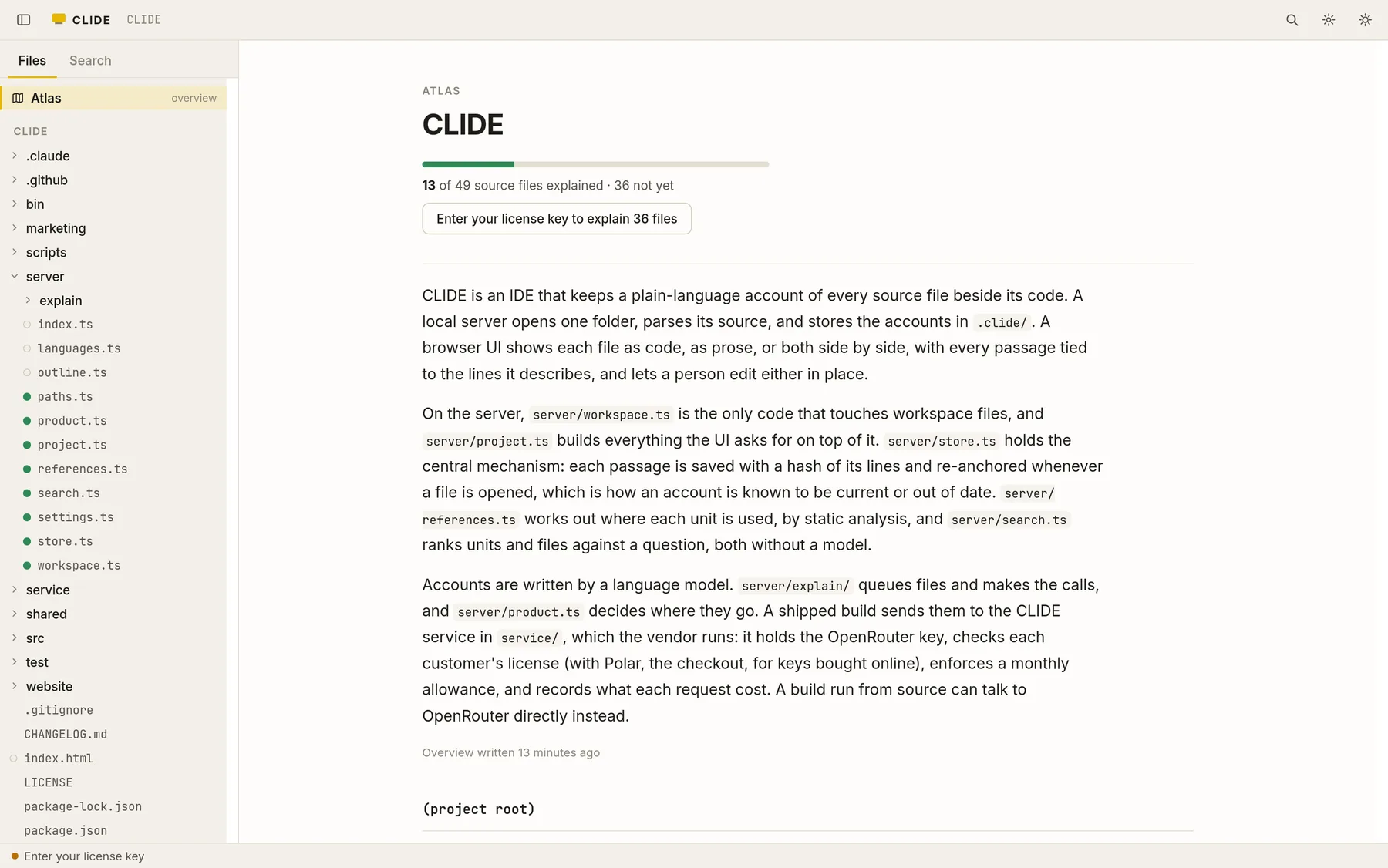
Every passage remembers the exact lines it was written for. When an agent or a teammate changes them, only that passage is marked out of date, and new code shows up as having no account yet. Moving code around changes nothing. One page, the Atlas, shows the whole project and how much of it is current.
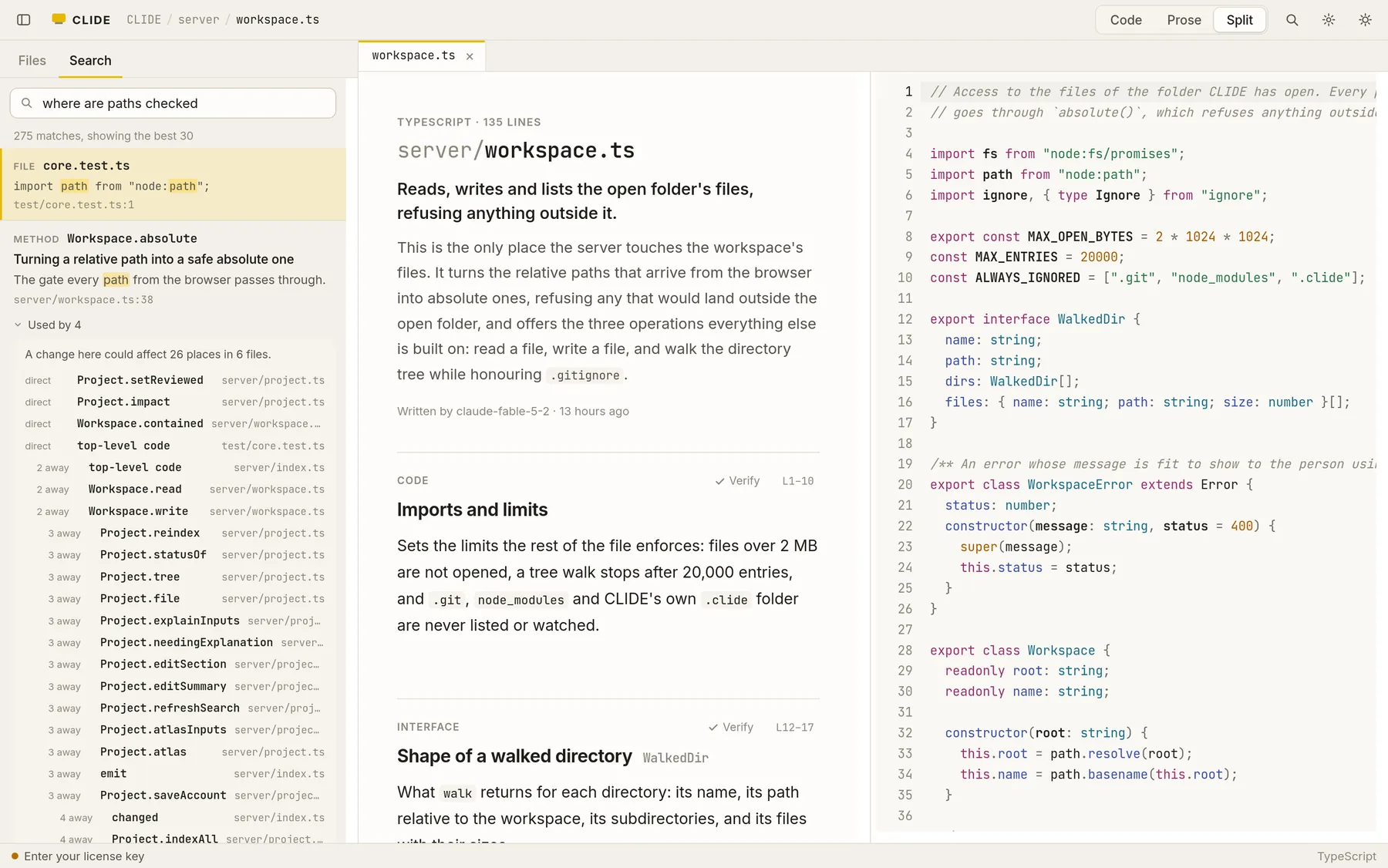
Search by name, by what the accounts say, or by what the code contains: "where are paths checked?" finds the function that does it. Each result shows what uses it and can list everything a change to it could reach. Search runs on your machine and never calls a model.
If a sentence is wrong or could be clearer, click into it and type, as you would in a document. What you write is marked as yours and is never overwritten while its code stays the same. You can also describe code yourself and skip the model entirely.
.clide/ folder in your project. Commit them, review them in pull requests, share them with your team.The privacy page has the details.
CLIDE is free to download and use. A plan adds accounts written for you, and you can choose one from inside the app.
1
Install it like any other app, and open it.
2
Choose your project's folder. Browse the outline and search straight away.
3
To have accounts written, open Settings, choose a plan, and press Explain.
Read the docs for everything else.
Paid plans include the model usage, so there is no API key to set up and no second bill. The app shows how much of the month's usage you have used. A month runs from the day you subscribe to the day your plan renews. If the usage runs out before then, writing pauses until it renews, unless you add a usage pack; everything else keeps working.
$0
Everything that runs on your own machine.
$10/month
Accounts written for you, for one developer's projects.
$25/month
For large codebases and heavy daily use.
Usage pack, $10. For a month when you need more: a one-time purchase that adds as much usage as a month of Solo. It is used only after your plan's usage for the month, what is left carries over, and you add it from Settings in the app.
Prices in US dollars, billed monthly, cancel any time. Payments are handled by Paddle, which adds any sales tax that applies where you live. Refunds within 14 days. You can subscribe here or from inside the app. Longer files use more of a month's usage than short ones.
It can be: accounts are written by a language model. That is why every sentence is tied to its lines, so checking is one hover instead of a matter of trust. Things that deserve a look are flagged, you can mark passages you have verified, and you can correct any sentence in place.
Only a file you choose to explain, at the moment you press Explain. Everything else, including search, runs locally. See privacy.
TypeScript, JavaScript, Python, Go, Rust, Java, C, C++, C#, Ruby, PHP and shell are parsed into functions, classes and methods, with "Used in" for each. Files in other languages can still be explained; the model divides them into sections itself.
No. CLIDE can edit and save files, but it has no terminal, language server or git view. Use it beside the editor and agent you already have: it picks up their changes as they are saved.
Accounts are ordinary files in .clide/, one per source file. Commit them and they travel with the branch, so a reviewer can read what changed in plain language as well as in the diff.
It is keyword search made smarter: it splits identifiers into words, matches word stems, knows common programming synonyms, and searches the accounts as well as the code. It is not an embedding model, so two passages that share no words won't find each other. In return it is instant, private, and free.
Writing pauses until your plan renews, which is when the month's usage starts again, and everything else keeps working. If you would rather not wait, add a usage pack from Settings: $10 once, for as much usage as a month of Solo. It is used only after your plan's usage for the month, and what is left carries over to the next one.
At any time, from the link in the receipt Paddle emails you. Your plan runs to the end of the period you paid for, and the accounts already written stay in your project.